Circles in Minecraft Generator: How to Build Perfect Pixel Circles Easily
Minecraft builders often struggle with curved shapes due to the block-based grid system. A circles in Minecraft generator simplifies creating accurate pixel circles by calculating block placements mathematically. These tools enable precise minecraft circle blueprints for domes, arenas, and more.
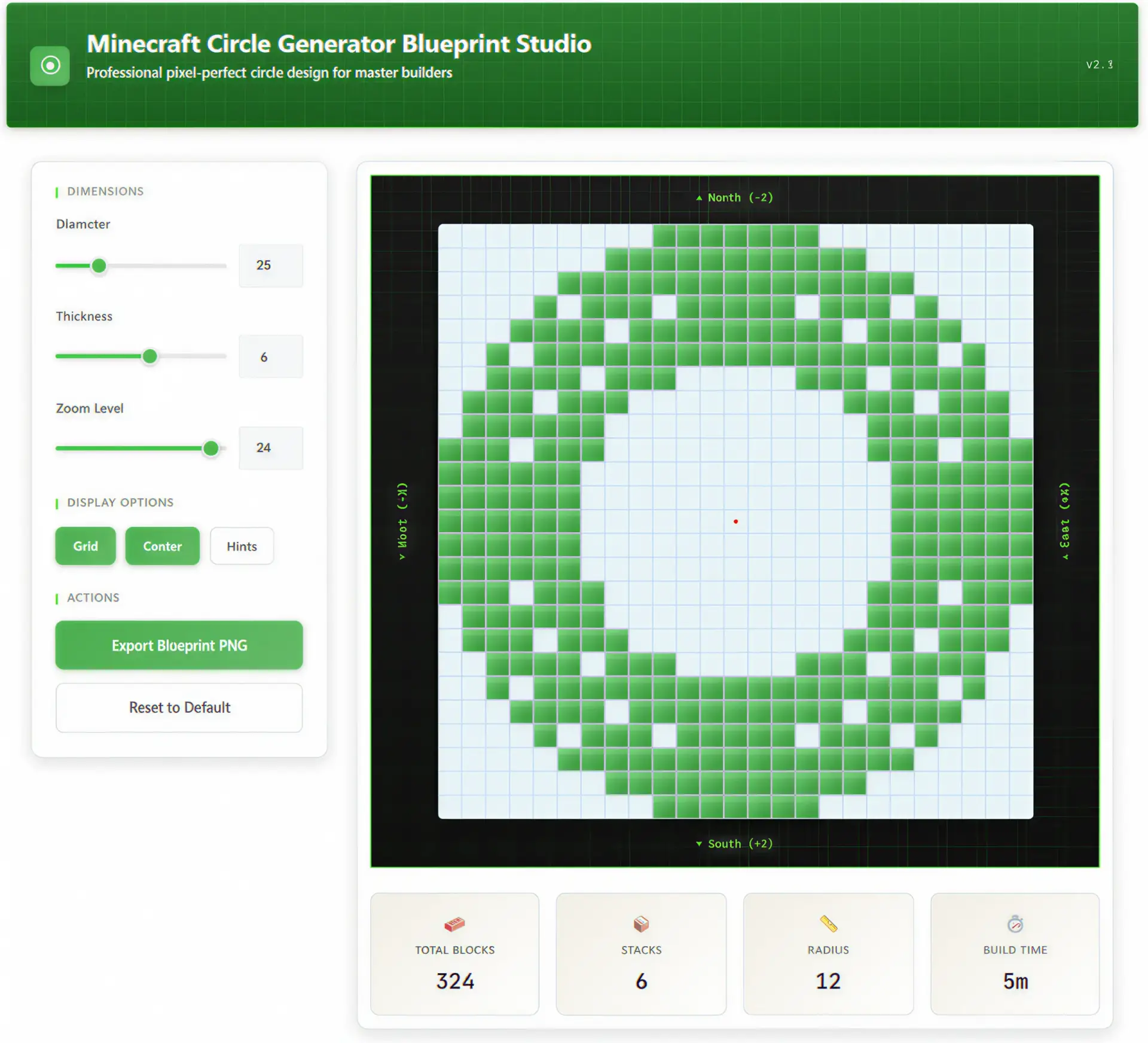
Why Circles Are Difficult in Minecraft
The Minecraft world uses a cubic block grid where each block occupies one unit in x, y, or z coordinates. True circles cannot exist on this integer grid, resulting in pixelated approximations that appear blocky, especially at smaller sizes. Builders must approximate curves using discrete block positions, which requires understanding radius logic and symmetry to avoid irregular shapes.
Pixel circles rely on algorithms like Bresenham’s circle algorithm to plot points closest to the mathematical circle equation on a grid. Without tools, manual plotting leads to errors, such as uneven quadrants or incorrect block counts. This grid limitation affects all structures, from simple rings to complex minecraft domes.
How a Circles in Minecraft Generator Works
A minecraft circle generator computes block positions for a given diameter and thickness using pixel approximation math. It outputs a visual blueprint or chart showing filled or hollow patterns, often with block counts for planning. These generators handle odd and even diameters, adjusting for smoothness by prioritizing blocks nearest the circle’s edge.
The logic involves iterating angles around the radius, snapping to grid points via distance formulas. For example, for a 20-block diameter, it places blocks where sqrt(x^2 + y^2) approximates the radius. This produces minecraft pixel circle charts ready for in-game transfer.
How to Make a Perfect Circle in Minecraft Using a Generator
Step 1 – Choose diameter
Select a diameter like 21 or 39 blocks for smoother curves; odd numbers center easily.
Step 2 – Generate blueprint
Use a Minecraft Circle Generator to input diameter and thickness, producing a pixel circle generator output.
Step 3 – Mark center block
In-game, place a temporary block at coordinates (0,0) as the center reference.
Step 4 – Build quadrant
Follow the blueprint’s first quadrant, placing blocks from center outward along the pattern.
Step 5 – Mirror symmetry
Copy the quadrant to opposite sides using world axes for perfect replication, reducing errors.
Step 6 – Verify radius
Measure distances from center to edge blocks; adjust outliers for uniformity.
Choosing the Right Diameter and Thickness
Optimal diameters like 21, 39, or 50 blocks yield smoother minecraft pixel circles due to better grid fitting. Smaller circles (under 10 blocks) look jagged, while larger ones require more blocks— a 50-block circle needs about 157 blocks for the outline. Thickness adds realism; 1-block for outlines, 3-5 for walls.
Use a minecraft radius calculator feature in generators to preview block counts and stacks. Even diameters work but may need offset centers. Test via minecraft circle chart for your build scale.
Practical Uses of Circles in Minecraft Builds
Circles form bases for arenas, wells, and bases in minecraft structure planning. They enable curved walls in castles or tree domes for aesthetic landscapes. In redstone contraptions, precise circles create circular farms or piston rings.
For mega-builds, stack circles into spheres using a minecraft sphere guide. Block grid circles enhance bridges and portals, improving immersion.
Advanced Tips for Domes and Spheres Using Circle Layers
Layer scaling logic
Generate circles with decreasing diameters per height level using the equation radius_h = sqrt(r^2 – h^2) for sphere slices.
Vertical alignment
Center each layer on the previous; offset by half-block visuals with slabs for smoothness.
Material planning
Calculate stacks via generator—large domes need thousands; gather in creative or survival prep.
Error prevention
Build quadrants first, mirror, then fill; use beacons for height reference.
Performance tips
Limit to 100-block diameters to avoid lag; build in chunks and light to prevent mob spawns.
How Digital Calculators Improve Creative Accuracy
Digital tools like the Minecraft Circle Generator eliminate guesswork, providing exact blueprints for minecraft building guides. They integrate with planners like the Palworld Breeding Calculator for cross-game efficiency or Random Animal Generator for themed builds. Similarly, the Forge of Empires Calculator shows how precise math aids strategy games, boosting creativity across projects.
These calculators output rotatable views and exports, speeding minecraft dome building by 5x over manual methods. They ensure symmetry, vital for large-scale accuracy.
Trending Questions About Minecraft Circles (FAQ)
What is the best circle generator for Minecraft?
Tools like pixel circle generators from Donat Studios or Calcify Labs excel for their accuracy and exports. They support large diameters and thicknesses without mods.
How do you make a perfect circle in Minecraft without mods?
Generate a blueprint online, mark center, build one quadrant, and mirror. Verify with measurements from center.
Why do Minecraft circles look blocky?
The 1x1x1 block grid forces pixel approximation; larger diameters reduce jaggedness.
What is the best diameter for smooth circles in Minecraft?
21, 39, or 50 blocks; odd numbers center perfectly and fit grid math well.
How many blocks are needed for a 50 block circle?
Outline uses ~157 blocks; filled adds interior based on thickness.
Can I build spheres using a circle generator?
Yes, stack scaled circles vertically per height formula for domes.
Does Bedrock and Java build circles differently?
No, both use same block grid; generators work cross-platform.
How do I convert real radius to Minecraft blocks?
Round to nearest integer; use generator’s radius calculator for approximation.
What is the fastest way to build large circles?
Print blueprint, use scaffolding for access, build quadrants symmetrically.
Can I export circle blueprints?
Most generators offer PNG or command exports for direct pasting.
Final Thoughts
Mastering circles unlocks advanced minecraft building guide techniques for professional structures. Practice with generators for efficiency. Experiment with diameters to match your vision.